Grow Horizontal Menu With Nice Font

Showing posts with label Recovery. Show all posts

Sunday, March 3, 2013

Farstone RestoreIT 2013 v20130201 / v20130205 | 331.7/677.7 MB


Farstone RestoreIT 2013 v20130201 / v20130205

Farstone RestoreIT 2013 v20130201 / v20130205 | 331.7/677.7 MB


RestoreIT is a new and powerful innovation designed to instantly restore and recover your entire PC in 2 minutes for simple and effortless recovery. Based on FarStone's patented "System Recovery" technology, RestoreIT is a powerful innovation designed to recover your entire Windows in 60-second for an effortless recovery from virus or any disaster. RestoreIT enables you to instantly recover files, remove viruses, or restore a crashed Windows by literally taking a hard drive snapshot of your entire system. A snapshot creation takes less than 5 seconds.

All Features List

Fix your computer in a snap!
Restore your entire Windows to a snapshot with only one-click.

Restore a Crashed Windows System in a Snap
RestoreIT can perform a bare-metal full-system restore in just a 2 minutes. No need to re-install Windows, or any applications.

Password Protection
Prevent unauthorized person to access to RestoreIT® 2013

Continuous Data Protect (CDP)
Continuously monitor changes to your hard drive, backup only the changed sectors right before it is changed

Hot-key Recovery Environment
Roll your system back to normal with the touch of a hotkey!

Restore everything
Restore all files, registry, Windows system files, settings and applications

Restore individual files
Search files in a snapshot, and restore individual files without restoring the entire Windows

Remove virus
Repair Windows and remove virus and malware

Home Page - http://www.farstone.com/software/restore-it.php

Saturday, March 2, 2013

BYclouder Data Recovery Pro v6.8 Multilanguage Portable | 7.37 Mb


BYclouder Data Recovery Pro v6.8 Multilanguage Portable
BYclouder Data Recovery Pro v6.8 Multilanguage Portable | 7.37 Mb

Recover lost data and files from any storage device. The main function of this program is to recover lost files, including audio/video, documents and archives, from any storage device: hard drive, CD-ROM, digital camera memory card, etc. BYclouder Data Recovery Pro ignores the file system layer and recover from the media layer directly. Thus even if the file system has been severely damaged or formatted, it can still work.

Detail Information:
File system:FAT, NTFS, exFAT, ext2/ext3/ext4 file system, HFS +.
File Format:Support most file formats contains more than 400 kinds of file extensions (about 225 files family).
Multimedia: video / audio / picture formats, file extensions over 150!
Office software: Microsoft / Adobe / OpenOffice, etc. more than 40 file extensions!
Others: support ordinary files, file extensions more than 200 file extensions!

Device Support :
CF card
Memory Stick
Secure Digital
Smart Media Card
Micro drive
MMC
USB memory drive
Hard disk
CD-ROM, DVD, Blu-Ray
Digital camera / video camera
Memory card
USB drive
PC/Laptop: Dell, IBM, HP, Toshiba, Sony?Ђ¦
Android tablet computer
Windows Tablet
iPad
Mobile Phone: iPhone, Blackberry, Nokia, Android phone.
MP4 Player: iPod touch, iPod (Nano, Classic & Shuffle)
Music player
Pen drive
Zip disks
Game console

Home Page - www.byclouder.com

DiskWarrior Bootable-DVD v4.4 | 1.17 Gb

ShadowProtect Recovery Environment Bootable-CD v4.2.5.16175 Multilanguage | 455 Mb


ShadowProtect Recovery Environment Bootable-CD v4.2.5.16175 Multilanguage
ShadowProtect Recovery Environment Bootable-CD v4.2.5.16175 Multilanguage | 455 Mb

Fast and Reliable Disaster Recovery & System Migration — P2P, P2V, V2P, V2V. StorageCraft ShadowProtect will create an automatic backup of your entire system including the operating system, applications, personal settings and data. Complete disaster recovery of your PC or laptop in minutes.

ShadowProtect provides a simple view to restore or update files and folders to your existing backup images. Automatically save online backup images to USB, FireWire, NAS or any network location.

ShadowProtect Desktop Edition provides fast and reliable disaster recovery, data protection and system migration for Windows desktops and laptops. ShadowProtect Desktop Edition provides hardware independent restore for physical to physical system (P2P) recovery. ShadowProtect Desktop also supports conversion from physical systems to virtual environments (P2V), virtual enironments to physical systems (V2P) and virtual environments to virtual environments (V2V).

ShadowProtect Desktop Edition is complementary to VMWare™ Workstation and Microsoft™ Hyper-V for fast and reliable disaster recovery. VMWare Workstation includes full support for ShadowProtect backup image files for simple conversion from physical systems to virtual environments.

ShadowProtect Features:
- Supports Windows 2000, XP, Vista and Windows 7.
— Bare metal recovery of Windows desktops and laptops in minutes.
— Restore or migrate backup images to and from physical systems and virtual environments (P2V, V2P and V2V).
— Hardware independent restore of backup images to dissimilar hardware (P2P).
— Schedule automatic full and incremental backups.
— Bootable recovery CD provides automatic hardware detection and network support.
— Simple view to quickly recover files and folders or update backup images.
— Compress and encrypt backup images for efficiency and security.
— Save backup images to USB, Firewire, NAS, SAN or any network location.

Schedule automatic backups
ShadowProtect provides an easy to use scheduler so that point-in-time backups can be taken automatically while you work. Schedule full or incremental backups of your system and data.

Save backups to any location
ShadowProtect backups can be saved to USB, FireWire, an attached storage device or network location.

View backup files for quick file and folder recovery
ShadowProtect point-in-time backups can be assigned a drive letter as a read-write or read-only volume. The mounting features of ShadowProtect allow you to restore files and folders or update an existing point-in-time backup.

Perform remote or bare metal system recovery
The ShadowProtect Recovery CD allows you to perform a bare metal system restore in minutes. The CD also includes a remote control tool to allow you to remotely recover your system and data without physically visiting the system.

Home Page - www.storagecraft.com


EASEUS Data Recovery Wizard v5.80 Edition WinPE | 142 Mb


EASEUS Data Recovery Wizard v5.80 Edition WinPE
EASEUS Data Recovery Wizard v5.80 Edition WinPE | 142 Mb

EaseUS Data Recovery Wizard WinPE Edition is designed for data recovery in case of any boot-up or system crash problem. There is no need for user to install it so the risk of overwriting lost data could be lowest and it will help computer users out of all data loss problems, format recovery, and recovering deleted files emptied from the Recycle Bin, or data loss due to partition loss or damage, software crash and other unknown reasons.

When to use?
• Hard Drives that have been formatted.
• Corruptted or missing critical file system structures.
• Accidental file deletion.
• File loss without reason.
• Unexpected system shutdown or application failure.
• Computer viruses and worms infection or corruption.
• Boot-up problems.
• Partition structures are damaged or deleted.
• Damage due to a power failure or surge.
• Recover files from devices with unknown file systems including Hard Disk, external ZIP/USB drive, removable SmartMedia, MemoryStick, SD cards, etc.

Key Features!
• Recover files from unreadable Dynamic Disk.
• Recover Linux files in Windows Systems.
• Recover deleted or lost files emptied from the Recycle Bin.
• File recovery after accidental format, even if you have reinstalled Windows.
• Disk recovery after a hard disk crash.
• Get back files after a partitioning error or hard disk crash.
• Get data back from RAW hard drives.
• Recover office document, photo, image, video, music, email, etc.
• Recover from hard drive, USB drive, memory card, memory stick, camera card, Zip, floppy disk or other storage media.
• Support FAT12, FAT16, FAT32, NTFS/NTFS5, EXT2/EXT3 file systems.
• New! Windows 2000/XP/2003/Vista/2008/Windows 7
• High quality of file recovery.
• Bootable media based on WinPE.
• Free file repair service.

Home Page - www.easeus.com


Thursday, February 28, 2013

Nsasoft SpotAuditor 4.5.5 | 2.5 Mb


Nsasoft SpotAuditor 4.5.5


Nsasoft SpotAuditor 4.5.5 | 2.5 Mb

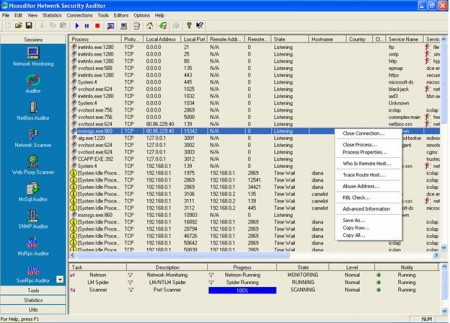
SpotAuditor is a Windows utility that offers comprehensive solution for recovering passwords and other critical business information saved in computers. SpotAuditor recovers Internet Explorer, Firefox, Opera, Outlook Express, MSN messenger, Windows Live Messenger, Windows Messenger, RDP, ICQ, VNC, Dial up, RAS, VPN, Trillian, Miranda IM, &RQ, Camfrog Video Chat, Easy Web Cam, WinProxy, Total Commander (Windows Commander), Far ftp client, WS_FTP, CuteFTP, File Zilla, FlashFXP ftp client, SecureFX ftp client, WebDrive ftp, FTP Voyager, CoreFTP, CoffeeCup Direct FTP, AutoFTP, FTP Control, FTP Navigator, 32bit FTP passwords and reveals IE Auto Complete Fields saved passwords, recovers passwords stored behind the asterisks (*****). The program also explores Visited URLs, Installed Programs and Start Run Programs on a local machine or remote computers.

Home Page - http://www.nsauditor.com/


Diagnostic and Recovery Toolset (MSDaRT) All in one (26.02.2013) | 1.10 GB


Diagnostic and Recovery Toolset (MSDaRT) All in one (26.02.2013)
Diagnostic and Recovery Toolset (MSDaRT) All in one (26.02.2013) | 1.10 GB

Boot disk for repairing Microsoft Diagnostic and Recovery Toolset (MSDaRT) All in one - allows users to boot the system from removable media, which makes it possible to start your computer, even if the total damage of the existing files on a disk operating system, vital for its start. Provides full access to NTFS-volumes, the system registry settings and drivers.

As part of the DOS utilities are available for testing, diagnostics and service drives. Optimized to run with multiboot stick.

Write to disk and flash:
Installation on a stick:
Installing on a USB flash drive
Run WiNToBootic.exe
Choose your flash drive
Select the file - the image MSDaRT.iso
Golochku put on Quick Format
Click Do it!
Attention! All data on the USB drive erased.
On all agree.
As a result, gets the boot flash with onboard MSDaRT
Restarting the computer in the BIOS to choose to boot from USB (USB_ZIP USB_HDD)

Write to the disk:
Run Iso-Burner.exe
Put a minimum write speed. Burn.
Restarting the computer in the BIOS to choose to boot from CD.

Installation on a multiboot stick
Open the image: MSDaRT.iso program UltraISO or 7Zip
Extract the folder with ERDC image to the root of the stick
In the configuration file menu.lst prescribes:
title MSDaRT ERD Commander All
map - unmap = 0:0 xff
map - unhook
root (hd0, 0)
chainloader / ERDC / bootmgr

The assembly includes:
ERD commander 5.0 for Windows XP (x32)
ERD commander 6.0 for Windows Vista (x32 - x64)
ERD commander 7.0 for Windows 7 (x32 - x64)
ERD commander 8.0 for Windows 8 (x32 - x64)
As part of an image of a floppy with DOS utilities:
Volcov Commander 4.99.08 alfa
Victoria 3.52
MDD 4.6
HDAT2 4.9.3
VIVARD 0.4
HDD Regenerator 2011
SpinRite 6.0
TestDisk 6.14
Active Uneraser 5.0
Active Partition Recovery 3.0
MBR Work 1.08
DiskPatch 3.5.300
HDD Sentinel 1.00.5
WDIdle 1.05
DMDE 2.4.4 Prof.Ed.
Optimized to run with multiboot stick.
All files are in the ERDC
Used loader BOOTMGR of Windows 8

Features:
Editing the registry: Utility Registry Editor ERD, available in Tools MSDaRT, provides information about the registry, which can help in recovery.
Restore access to the system: For a local user account and change the password, you can use the Master password changes.
Diagnosis of system failure: To identify the cause of system failure and determine which driver caused the failure, you can use the wizard Crash Analysis.
Restore partitions and volumes: To restore the partitions or volumes, you can use the application Disk Commander.
Recover deleted files: Utilities File Recovery can be used to find and recover deleted files from any supported file system Windows.
Cleaning disks or volumes: To clean the disks or volumes, you can use the Disk Cleanup utility.
Search for specific files: search utility allows you to limit the search by specifying the name, location search, the estimated size of the file or the file modification time.
Browse titles: Utility Explorer allows you to view files and folders that are stored on different disks.
Perform administrative tasks of managing your computer: Computer Management utility provides recovery tools to perform the following tasks.
Turn off hard disks, or services that cause errors.
View event logs.
How to partition and format the hard drive.
Getting information about startup files.
To obtain information about your computer.
Configuring TCP / IP: Configuration Utility TCP / IP allows you to display and configure the TCP / IP.
Removing patches and service packs Windows: With the removal patch can remove Windows hotfix or service pack from the system that can not run.
Check and repair system files: System File Checker allows you to check and repair any damaged or missing system files.
The use of anti-malware: independent validation tool to determine malware or other unwanted programs and provide a warning of the potential danger.

Opportunities utilities:
Volkov Commander - file manager that runs in Windows and MS-DOS.
Victoria - The program is designed for testing, diagnostics and servicing IDE and Serial ATA drives.
MHDD - this is the most popular freeware program for low-level HDD diagnostics.
HDAT2 - a program for testing and diagnostic disks. The main advantage over MHDD and Victoria: support almost all disk drives ATA / ATAPI / SATA, SSD, SCSI, and USB.
VIVARD - a powerful and easy to use software to diagnose HDD.
HDD Regenerator - a unique program that allows you to recover physically damaged hard disk drives.
SpinRite - Utility to test, maintain, and restore the data to the hard drive.
TestDisk - a program to recover lost partitions or restoring boot records on disks.
Active @ UNERASER - effective tool for DOS and Windows, restore files to systems FAT12, FAT16, FAT32, NTFS.
Active @ Partition Recovery - a program to restore a partition your hard drive after a virus attack or any system failures.
Mbrwork - used to restore the partition table.
DiskPatch - a professional data recovery utility that recovers data by restoring the damaged structure of the disk (partition table).
Hard Disk Sentinel-utility to monitor and control the status of hard drives.
WDIdle - a program to change the parking heads on hard drives.
DMDE - program for editing disk and data recovery.
Active @ Password Changer - the program allows you to reset the password on the system installed Windows

What's new:
Now Plop and decent utility (hddarts) run with the disc
Dos image added mouse driver
Dos image added to the program Active @ Password Changer 4.0 Rus
Dos image added Volcov Commander in Russian

System requirements:
32-bit (x86) or 64-bit (x64) processor 1 GHz
RAM: 512 MB for x86
RAM: 1 GB for x64

Title: Diagnostic and Recovery Toolset (MSDaRT) All in one
Version: 5.0, 6.0, 7.0, 8.0
By assembling: Joker-2013/conty9
Language: English / Russian
Treatment: not required
Size: 1.10 GB


Wednesday, February 27, 2013

Card Recovery Pro 2.1.5.0 Portable | 12.84 Mb


Card Recovery Pro 2.1.5.0 Portable

Card Recovery Pro 2.1.5.0 Portable | 12.84 Mb

The program, which is designed to restore files from memory cards. Card Recovery Pro allows you to effectively restore information lost as a result of the removal of files, formatting the card, hardware failures, virus attacks, etc. The product supports work with a memory card format SD Card(Secure Digital card), MicroSD (TransFlash), SDHC, miniSD card and a number of others.

Professional Memory Card Recovery Software Recover Lost or Deleted Photos in 3 Steps.

Recover Lost Memory Card Under All Conditions
Accidental Deletion Events
-Delete -- "Shift + Del" key entry (with no prior backup)
-"Delete All" selected in error
-Selected "Delete" instead of "Save"
-Recycle Bin erroneously emptied (and no backup)

Accidental Formatting or Reformat (examples of recoverable events)
-Formatted Media/Device in error
-Initialized target storage when memory card newly connected
-Storage device accidentally formatted

Improper Operation
-Factory reset
-Powered off device (camera etc.) during write process
-Card mistakenly used in different cameras
-SD Card removal while device is powered on

Other Recoverable Scenario
-Virus infection
-Unexpected power off
-Lost photos during transferring photos from storage devices to PC/laptop
-File system corruption: camera storage device, hard drive or
-USB flash drive

Supported Devices by Manufacturer
-Nikon, Canon, Kodak, FujiFilm, Casio, Olympus, Sony, SamSung, Panasonic
-Fuji, Konica-Minolta, HP, Agfa, NEC, Imation, Sanyo, Epson, IBM, Goldstar
-LG, SHARP, Lexar, Mitsubishi, Kyocera, JVC, Leica, Phillips, Toshiba, SanDisk
-Chinon, Ricoh, Hitachi, Pentax, Kinon, Verbatim, Vivitar, Yashica, Argus, Lumix
-Polaroid, Sigma and almost all digital camera brands on the market

Supported Card and Storages
-SD Card(Secure Digital card), MicroSD (TransFlash), SDHC, miniSD card
-MMC card MultiMedia card
-CF card , Compact Flash card, CF Type I, Type II, MicroDrive
-Memory Stick, Memory Stick Pro, Duo, Pro-HG, XC, Micro(M2)
-SmartMedia, flash card recovery
-xD Picture card recovery


Monday, February 25, 2013

RaidLabs File Uneraser 2.1 Portable | 10.5 Mb


RaidLabs File Uneraser 2.1 Portable

RaidLabs File Uneraser 2.1 Portable | 10.5 Mb

RaidLabs File Uneraser - software securely recovers deleted files and documents, digital pictures, music, videos, RAR and ZIP. File recovery tool can recover entire folders. This program can help even the most hopeless cases. Recover lost or deleted files from the Recycle Bin, USB flash drives and storage drives!

Key features:
recovery of any file type;
Restore deleted documents, pictures, e. letters, archives, audio and video files;
Recover files after the Trash;
data recovery from FAT partition, and NTFS;
complete recovery by scanning the whole disk;
Recover files from NTFS disks, even in earlier versions of Windows;
Preview of deleted files.

File Uneraser can undelete files from all types of storage media including memory sticks, digital cameras, flash drives, USB drives and pretty much any other type of a storage device you can connect to your PC and access as a drive letter. In addition, this undelete software works with NTFS-encrypted and compressed files, and can help you recover files lost from a virus attack, malicious or accidental user activities. No special skills and no information recovery training are required! Try File Uneraser free with full pre-recovery preview.

RaidLabs File Uneraser can:
Undelete all types of files
Unerase deleted documents, pictures, emails, archives, audio and video files
Undelete files from emptied Recycle Bin
Recover data from FAT and NTFS partitions
Perform comprehensive recovery by scanning the entire volume
Undelete files from NTFS disks even in older versions of Windows
Preview deleted files even in the free version

Saturday, February 23, 2013

NETGATE Data Backup 3.0.405 Multilingual | 3.5 MB

NETGATE Data Backup 3.0.405 Multilingual


NETGATE Data Backup 3.0.405 Multilingual | 3.5 MB

NETGATE Data Backup is an effective tool to backup your files, photos, music and any important data on your PC. With NETGATE Data Backup you can even backup your MySQL/PHP databases from your webpage or your blog. Defragment and backup your registry with one simple click. NETGATE Data Backup supports scheduling of automatic backups at specified time. For extended security user has the option to encrypt or compress backuped files.

Data Backup Features:
- Backup - backup of your files, photos, music and important data on your PC.
- Database Backup - backup of your MySQL databases running on PHP supported server, suitable for backup of you web sites and blogs.
- Registry Defragmentation
- Registry Backup and Restore
- Startup Manager - manages all applications that starts at Windows startup
- Uninstall Manager - handy tool for quick uninstall of application from your system
- Compression support - backuped files can be compressed using bzip2 compression method
- Encryption support - backuped files can encrypted using user supplied key/password.
- Scheduling support - backup can be scheduled at specified time
- Multilanguage translation support
- Skin support
- Premium technical support

Home page - http://www.netgate.sk/