Grow Horizontal Menu With Nice Font

Showing posts with label 3D. Show all posts

Saturday, March 2, 2013

Golaem Crowd v2.2.2 for Maya 2011-2013 x86/x64 | 238 MB


Golaem Crowd v2.2.2 for Maya 2011-2013 x86/x64
Golaem Crowd v2.2.2 for Maya 2011-2013 x86/x64 | 238 MB

Creating visually compelling and believable crowds, when budgets are shrinking and timescales are getting shorter, can be a challenge. It is not only important to represent the crowd behavior as a whole, but the appearance and motions of each individual must be believable.

Developed and tested under real production conditions, Golaem Crowd allows to easily simulate complex and controllable characters in Autodesk® Maya®.

Download

SketchList 3D Pro v3.0.1.2149 WiN | 88.6 MB


SketchList 3D Pro v3.0.1.2149 WiN
SketchList 3D Pro v3.0.1.2149 WiN | 88.6 MB

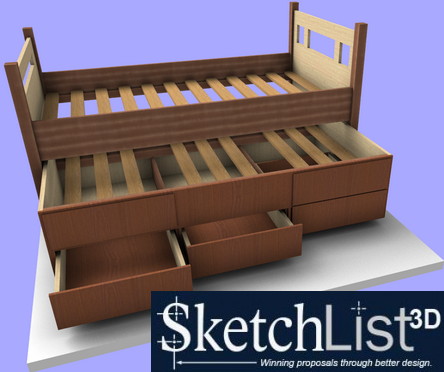
SketchList 3D was designed from the beginning as integrated 3D software for furniture, cabinetmaking, woodworking, and the remodeling tasks that include making built-ins.

SketchList 3D was designed to keep users from requiring large amounts of training like the more traditional CAD (computer aided design) packages do.

SketchList 3D uses terms like left and right, top and bottom, and width / depth / length to let users describe what they want to do. The software steadfastly avoids requiring users to know X, Y, and Z, tangents, layering, extruding — all the other things that make CAD so hard to learn and use. CAD draws with lines. SketchList builds 3D models using boards, doors, and drawers and lets you apply contours, joinery, holtes, shapes…..

There’s more…

SketchList 3D automates regularly used woodworking functions like contour edges, joinery, drilling holes and slots, equal spacing of objects like shelf peg holes.
With SketchList 3D you can shape a board – cut miters, cove moldings, almost anything you might do in the shop.
Reports are automatically generated when you add or change a board, door, or drawer within your project. If you add a 1/4 tenon to a board – the cut list immediately lengthens the cut part by 1/4?.
Shop drawings, parts lists, cut lists, purchase lists, optimized layout diagrams of materials and parts.
You can do virtually anything with the assemblies you design. Stretch and shrink, rotate, duplicate, and even clone and space assemblies over any given distance. Make one assembly such as a carcass and save it – and use it over and over again. Saves time.
3D renbering in photo like quality. You can even send a rotating 3D model to your clients via email.

SketchList 3D Professional:

Allows you to compete more effectively.
Increases sales and profits.
Involves prospects with proposal preparation.
Wins more high end business.
Takes hours off your proposal preparation time.
Increases the professionalism of your proposals.
Automatically generates parts lists, cutting layouts, purchase lists, and drawings.
Reduces mistakes and minimize material waste.
Saves time.

Download

Thursday, February 28, 2013

Live Interior 3D pro 2.8 (548)


Live Interior 3D pro 2.8 (548)

Live Interior 3D pro 2.8 (548)
English | Live Interior 3D pro 2.8 (548) | 439 MB


Live Interior 3D Pro - is a powerful tool to create a variety of interiors.
The program has 50 editable masks interiors and plans. You can choose one of them and change it to your liking, or start from scratch - draw 2D plan, add and place objects on your taste.
The program allows you to flawlessly switch between 2D and 3D preview. Objects can be added and edited in both modes.
There exports of finished projects in QuickTime.


Buy a Premium Account Rapidgator = High speed+parallel downloads!
DOWNLOAD HERE(rapidgator):
http://rapidgator.net/file/80356035/LI3Dpro_2.8.dmg.html

Mirror (ryushare):
http://ryushare.com/256156e9ed65/LI3Dpro_2.8.dmg

Mirror (uploaded):
http://uploaded.net/file/7i9aj69q/LI3Dpro%202.8.dmg

Tuesday, February 26, 2013

Room Arranger 7.2.1.306 | 9 Mb


Room Arranger 7.2.1.306


Room Arranger 7.2.1.306 | 9 Mb

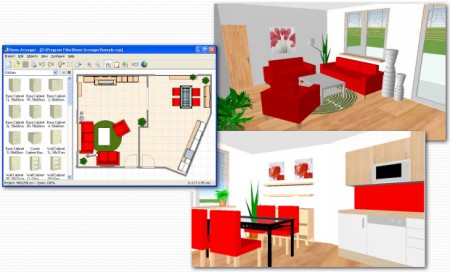
Room Arranger is 3D room / apartment / floor planner with simple user interface. Once you get the basics, you can draw whatever you imagine. While having wide library of objects, you can easily create your own piece of furniture.

Features

Easy to Use

Room Arranger is small and compact piece of software. Still it lets you design nearly anything you imagine. Once you understand the basics it's easy to bring it to next level.

Nearly all functions have keyboard shortcuts, so you can learn to be pretty fast in Room Arranger.

3D Visualization
3D can give you a better impression of your design. Room Arranger will not only let you fly around the scene, but you can also walk through it like in reality.

Wide Object Library
There are nearly 300 objects in the standard object library. Furniture, and other equipment. For each of them, you can modify their dimensions exactly as you need - you are not limited to what we think is the most common.

Additionally you can quickly and easily design all your special objects directly in Room Arranger, there is a set of 3D objects just for such needs. Some users contributed to our On-line object library and shared their work.

Measurement
There is a measurement tool in Room Arranger that helps you to check if there is enough space left for other objects, or just visualize the dimensions in the project.

The software also measures the room areas, wall areas and other useful values. It will let you copy - paste them to Excel for further processing.

Print in Scale
Printing is the integral part of designer's work. We try to make this output precisely and in high quality. Professional architects usually require printouts in exact 1:50 or 1:100 scale, which is possible in Room Arranger.

In case you have only small A4 printer, the software manages to print the project over more pages. You will just glue all sheets of paper together.

Build on Floor Plan Image
Drawing walls can be quite time consuming for apartment or house design. So there is a way to make it easier in case you have an image or photo of the floor plan.

Just load the image of the floor plan into the Wall Editor, calibrate it, and draw walls on top of it.

Home Page - http://www.roomarranger.com/


Saturday, February 23, 2013

Artlantis Studio 4.0 16.0 x32+x64


Artlantis Studio 4.0 16.0 x32+x64

Artlantis Studio 4.0 16.0 x32+x64
English | Artlantis Studio 4.0 16.0 x32+x64 | 402 MB


Artlantis - a unique program for 3D visualization, which allows fast and very easy to get high quality photographic project, scenes and animation.
Artlantis Studio, on the other hand, is ideal for those who want a very high resolution to make not only for images, but QuickTime VR Panoramas, Objects and animations as well.
Note: All-date antivirus software, perceive a treatment as viruses. This applies to the hand, and all other drugs in general.
So, turn off antivirus software, installing and downloading if they are blocking drugs.


Buy a Premium Account Rapidgator = High speed+parallel downloads!
DOWNLOAD HERE(rapidgator):
http://rapidgator.net/file/78974182/Artlantis.rar.html

Mirror (ryushare):
http://ryushare.com/1c49087737cf/Artlantis.rar

Mirror (uploaded):
http://uploaded.net/file/xqpjs72k/Artlantis.rar

3DSom Pro 3.2.0.0 x86


3DSom Pro 3.2.0.0 x86

3DSom Pro 3.2.0.0 x86
English | 3DSom Pro 3.2.0.0 x86 | 131 MB


To run on a Mac you will need an Intel based Mac and a copy of Windows. NOTE: 3DSOM Pro has been developed for Windows Operating System so to run on a Mac you need to run Windows under OS X Boot Camp, VMware or install Parallels Desktop. We plan to have a native Mac OS X port in future.


Buy a Premium Account Rapidgator = High speed+parallel downloads!
DOWNLOAD HERE(rapidgator):
http://rapidgator.net/file/78973250/3DSom.rar.html

Mirror (ryushare):
http://ryushare.com/567e31ba02fc/3DSom.rar

Mirror (uploaded):
http://uploaded.net/file/5c8fnuja/3DSom.rar

3D Object Converter v4.60 x86


3D Object Converter v4.60 x86

3D Object Converter v4.60 x86
English | 3D Object Converter v4.60 x86 | 2 MB


Converter / viewer most 3D file formats with batch conversion. It works with a 600 file formats. The program offers several display modes only a skeleton model, "flat" painted, object method Mount overlay materials.
Automatic recognition of the file format.
Automatic verification of the landfill and repair functions at boot time.
Automatic self-test function on each start from viral infections.
Module Batch Converter.
Black and white / flat shaded / Guru shaded / vertex color shaded / textured rendering mode.
"Drag and Drop" support (to load object).
Quick import and export.
Fully dynamic memory allocation, so the program only uses as much memory as it needs.
Material per polygon support.
Material Editor.
Multiplatform ASCII file loader technology.
Not required DLL-halyards.
Options / general appearance, color, import, export / (Ctrl-O).
Portable application.
Storage and processing the vertices as double precision.
Storage and processing of the face as N-Sided polygons.

Raylectron render for Sketchup 2.65 x86 x64


Raylectron render for Sketchup 2.65 x86 x64

Raylectron render for Sketchup 2.65 x86 x64
English | Raylectron render for Sketchup 2.65 x86 x64 | 53 MB


Turn your Trimble Sketchup 3D models into photorealistic images. View your renders in Stereoscopy, no hardware required!
Raylectron a photorealistic renderer for Trimble Sketchup. The technology, which is based on a module is unique in contrast to the others. Developed on the basis of the light, it can work faster, while respecting the basic fundamental laws of physics. The use of different proprietary algorithms developed over many years of research by SoftByte Labs, allows to achieve photo-realistic output without the need for complex material settings (you can not tell from the photo rendering).
In fact Raylectron so simple and easy to work with it, everyone can. Raylectron uses three different technologies, each is as simple as the others. Depending on the requirements, photorealism can achieve less than a minute, well, for perfectionists, stop on reaching perfection!
Instantiation ...
Have you ever tried to duplicate the high poly model tree a hundred times? ... And throwing this thing, because Sketchup use all the memory and virtually no reaction? Yes, easily, and we have the solution. Instantiation of components and groups can duplicate any component or group without increasing the number of polygons and memory. In fact, each instance is only 12 landfills, regardless of the number of polygons of the original. Create huge forests, large metropolitan areas, grass, etc.

PlayMaker Unity3D 1.3.2 x86+x64


PlayMaker Unity3D 1.3.2 x86+x64

PlayMaker Unity3D 1.3.2 x86+x64
English | PlayMaker Unity3D 1.3.2 x86+x64 | 1.16 GB


Advanced extension for Unity3D. Allowing no knowledge of programming languages ??to use visual scripting. Thanks PlayMaker you can easily create their own games, and is based on blocks of actions and events. Has hundreds of built-in scripts and works with all classes of Unity. Now you do not have to write code by hand, all it will do the PlayMaker.


FaceGen Modeller v.3.1.2 Full


FaceGen Modeller v.3.1.2 Full

FaceGen Modeller v.3.1.2 Full
English | FaceGen Modeller v.3.1.2 Full | 20 MB


Excellent program for creating realistic images of faces. Bunch of options. The only drawback - they are in English, but to understand what's what, you can.
There is a genetic method of forming parties.


Buy a Premium Account Rapidgator = High speed+parallel downloads!
DOWNLOAD HERE(rapidgator):
http://rapidgator.net/file/78975265/FaceGen_Modeller_3.1.msi.html

Mirror (ryushare):
http://ryushare.com/53c3b3cb789f/FaceGen_Modeller_3.1.msi

Mirror (uploaded):
http://uploaded.net/file/hrg07nd6/FaceGen%20Modeller%203.1.msi

Braid Art Labs GroBoto 2.1.8.1


Braid Art Labs GroBoto 2.1.8.1

Braid Art Labs GroBoto 2.1.8.1
English | Braid Art Labs GroBoto 2.1.8.1 | 135 MB


The new version of 3D-editor unusual Groboto. Compared to other programs to work with three-dimensional graphics Groboto distinguished by the fact that there is a simple set of tools for modeling, with which you can quickly create organic models, as well as abstract forms. Working in the program, the designer can use any bitmap image to create textures, in this case, the correct texture mapping on the object and there is no "seams" will take care of the program itself. In GroBoto have the means to create the environment - the fog effect, color gradients and a generator to create stars of the sky. Visualization GroBoto takes much less time than in other applications for 3D-modeling.
In an era of unchallenged dominion graphics package category of "all in one" does not abate interest in compact applications that perform specific tasks faster and more effective generic counterparts. Pretty original design called GroBoto - one of them.
Work Meets Meyer Mother Nature - a vivid example of the algorithms in action GroBoto
Inheritance of product developed by artists of Braid Art Labs - creating unique in design of bulk forms. Program algorithms generate not only the usual architectural eye, but also a very rare organic and even completely unique surreal elements, which are then considered to be finished image or included in a large-scale composition.