Grow Horizontal Menu With Nice Font

Showing posts with label Print. Show all posts

Saturday, December 6, 2014

ClickBook 15.0.0.0 | 22.61 MB


ClickBook 15.0.0.0

ClickBook 15.0.0.0 | 22.61 MB

ClickBook is an award winning booklet printing application, made by Blue Squirrel, that saves you both time and money. ClickBook can save you up to 75% on ink and paper. ClickBook also offers the convenience of printing your own booklets or brochures, saving you time and money.

No more searching for or purchasing different bulletins or brochures for every occasion, or running around town looking for a local printing shop to print your booklets. Simply create the brochure, bulletins, or booklets you want and print them in ClickBook using any of the 170 plus different layouts (50 plus for the Mac).

Key ClickBook features

Printing Books

Print books of any size from a simple fold paper in half, CD insert books, convenient wallet books, and even novelty doll sized books.

Printing PDFs
Make PDF files to keep or send to others. Make online bulletins, newsletters. Save your tax records on disk, or e-mail receipts to your customers.

Printing Posters and Banners
With one click turn a Word documents or photograph into a huge banner or poster. Wide banners are great for Welcome Home and Happy Birthday signs. Large posters are great for getting attention, marketing, or announcing events.

Layouts
The Layouts have been organized into two lists, Categories and Layouts. This will allow you to find a layout much quicker and easier. The Categories list breaks the layouts into logical groups, such as Favorites, Books, Brochures, etc. The Layouts list contains the layouts from the category that is selected. For example, if you look in the Books category, the Layout lists layouts for a 4 up book, Side by Side book, CD Jewel Box, etc.

Multiple documents in one booklet
You can print multiple documents together as a single booklet. They can even be from different applications! For example, you could print a pretty front cover from your graphics program, then documents from your word processor, spreadsheet, and graphics programs, mixed with a file found by your network browser.

You just send each document to the ClickBook printer. ClickBook pops up and collects the documents. When you click the Print button, ClickBook combines the documents and prints the book.


Whats new in ClickBook 15?
- Improved Setup Streamlined setup.
- Improved PDF Support PDFX

Tuesday, February 26, 2013

Directory List and Print Pro 2.15.0.0 | 4.3 MB


Directory List and Print Pro 2.15.0.0
Directory List and Print Pro 2.15.0.0 | 4.3 MB

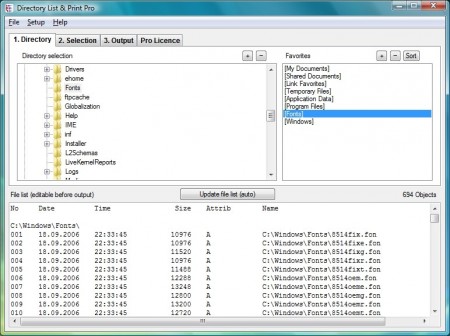
Directory List & Print is a software tool for Windows™ and enables listing and printing the content of any directory in a simplest way. By copying to the clipboard the lists can be exported into other programs or opened directly in Word™ and Excel™. The Free Version (Freeware) has all the basic features included, the Pro Version (Shareware) provides interesting additional features.

Features

Pro Version (Shareware) and Free Version (Freeware)

- Selection of directories to be listed by a tree structure.
- Selection of directories by entering the path as a text string.
- Drag & Drop of directories (or a file) from Windows Explorer.
- Integration of "Open in Directory List & Print" in the directory context menu of Windows Explorer.
- Direct selection of important system directories as "My Documents" etc.
- Listing of sub-directories and/or files and looping through sub-directories (recursion).
- Update file list automatically or manually.
- Display of last modification date.
- Display of last modificatione time.
- Display of file size.
- Display of file name with or without directory path.
- Display of file names with or without file extensions.
- Indication of number of entries of files and directories in the list.
- Print directory listing, direct printing of corresponding list.
- Export list into other programs by copying to the clipboard. The corresponding data will be organized in columns and separated by tabs so that the list can be pasted directly into Excel ™ as a table.
- Open the list directly in Microsoft Word™ and Excel™.
- Support for connecting and disconnecting network drives.
- Automatic saving of display options when exiting the program.
- Start program with a directory path as a parameter.
- Portable Application, no installation necessary.

Pro Version only (Shareware)
- Save own directory favorites.
- Set directory recursion depth for subdirectories.
- Display of file attributes such as Read Only, Hidden, System, etc.
- Calculate CRC32 checksums for files.
- Display format of audio/video and image files.
- Display of dimensions like width, height, bit depth or frames/s.
- Display duration and title of audio and video files.
- Display of sampling and bit rates for audio files.
- Display of a continuous numbering of the objects.
- Display of column titles in the first row.
- Show number and sum of size and length of the displayed objects.
- Display of the date in many different international formats.
- Set filter to include or exclude certain file types.
- Set filter to include or exclude files and directories by certain terms.
- Set filter on length of filenames, eg. to analyze the file system when copying it to a new directory structure (path+filename, filename only, >, =, <).
- Output the list directly to the default printer.
- Output the list in comma- or tab-delimited file or CSV file.
- Linking of files and directories in Excel™ for direct open by mouse click.

Audio/Video and Image files supporting additional information
- ogg, ogm, avi, wav, mpeg, mpg, vob, mp4, mpgv, mpv, m1v, m2v, mp2, mp3, asf, wma, wmv, qt, mov, rm, rmvb, ra, ifo, ape, mac, flac, dat, aiff, aifc, au, iff, paf, sd2, irca, w64, mat, pvf, xi, sds, avr, wtv, dvr-ms
- bmp, png, gif, jpg, jpeg, jpeg2000 (jp2, j2k, j2c), jng, jif, jpe, tiff, tif, tga, targa, ico, pcd, pcx, cut, dds, exr, g3, hdr, lbm, koa, mng, pbm, pfm, pgm, pct, pic, pict, ppm, ras, raw, nef, nrw, dng, crw, cr2, sgi, wbmp, xbm, xpm

System Requirements
- Microsoft Windows™ XP/Vista/7.
- About 7 MB disk space.