Grow Horizontal Menu With Nice Font

Showing posts with label Boot. Show all posts

Sunday, March 3, 2013

SF-Reboot-To v1.2.4.7 - Your Win dual boot solution | 4.34 Mb


SF-Reboot-To v1.2.4.7 - Your Win dual boot solution
SF-Reboot-To v1.2.4.7 - Your Win dual boot solution | 4.34 Mb

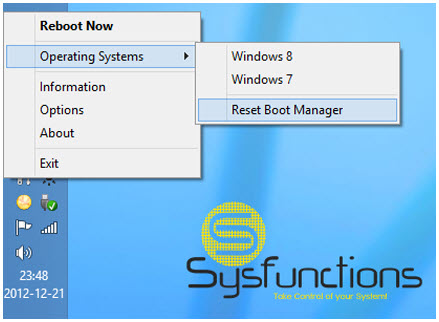
This program is just like NeoSmart Technologies iReboot : It allows you to pick the os you boot into next but unlike iReboot this one is free and will be supported here as long as it gets some sort of interest

How To Use
#1: Just select your operating system from the list and click!!!
#2: Reboot 
#3: Enjoy!

Features
#1. Select OS to boot into.
#2. Options to reboot on selection.
#3. Uptime information and other system information.
#4. Start with windows (start with the Reboot-To service) options.
#5. Options to reboot back into your default OS.
#6. Update notifier so you know you are using the latest version.

Support List: 
Window Vista - Reboot to is supported
Windows 7 - Reboot to is supported and install is supported
Windows 8 - Reboot to is supported and install is supported
Windows Server 2008 R2 - Reboot to is supported and install is supported
Windows Server 2012 - Reboot to is supported and install is supported
Ubuntu (wubi) - Reboot to is supported
Ubuntu Server (wubi) - Reboot to is supported

It will allow boot into those operating systems from your Windows OS running Reboot-To and there might be more but I have not tried it yet.

Requirements
Microsoft Windows Operating System
.NET framework 3.5

1.2.4.7 :
Updated menu form to be compatible with System Functions ShortCuts.
Added Names to threads for debuggers and beta testers.
Improved IAP Memory Manager
Added detection of previous settings.
Added Memory Diagnostics Tool options.
Directly Manages BCD settings - Removed BCDEdit from Microsoft
Added Time difference to boot up time and current os time - Hours|mintues|seconds

Thursday, February 28, 2013

Boot USB Sergei Strelec 2013 v.1.8 Full | 352.23 Mb


Boot USB Sergei Strelec 2013 v.1.8 Full
Boot USB Sergei Strelec 2013 v.1.8 Full | 352.23 Mb

Updated boot disk Windows 7 PE. On the drive there is a large set of programs to work with hard drives, backup and restore disk and partition, fix boot, reset passwords, data recovery, delete SMS blockers etc. ..

Main features:
Loading speed. Unpacking programs in RAM disk after loading the kernel.
Booting from USB2 I have 1 min.
Loader vindovyh BOOTMGR
The disc content is loaded into the RAM on your computer, after downloading, you can remove the disc from the drive, or USB flash drive.
When you boot from the stick labels - Press any key to boot from CD ot DVD .... will not, so if the BIOS to first boot installed
with USB-HDD, USB flash drive after loading or before rebooting remove, or after rebooting again will boot from the stick.
In the way of additional integration drivers most extended ones disk controllers.
Network support.
Convenient for resolution is put automatically, but you can set the desired hand.
In the BIOS to boot first device set CD ROM or USB-HDD, respectively, or when the computer to cause the boot
menu and select to boot from USB-HDD or CD ROM, if the BIOS supports it.
If you want faster download recommended for use with a bootable USB drive. Software for creating and instructions are in the archive.

Composition of the programs:
Acronis True Image Home 2013 16 Build 5551 Plus Pack (Rus)
Active Disk Image Professional 5.4.2 (Rus-my translation)
Drive Snapshot 1.42.16494 (Eng)
R-Drive Image 4.7 build 4737 (Rus)
Paragon Hard Disk Manager 12 Professional 10.1.19.16240 (Rus)
AOMEI Data Backuper 1.1 (Russian version WYLEK)
Ghost 11.5.1.2266
Acronis Disk Director Home 11.0.2343 Update 2 (Rus)
Paragon Hard Disk Manager 12 Professional 10.1.19.16240 (Rus)
MiniTool Partition Wizard 7.7 Server (Russian version WYLEK)
EASEUS Partition Master 9.2.1 Server (Eng)
AOMEI Partition Assistant Professional 5.1 (Rus-my translation)
Active Partition Recovery Enterprise 8.0.2 (Eng)
Acronis Recovery Expert (Rus)
R-Studio 6.2 build 153617 Network Edition (Rus)
Active File Recovery Pro 10.0.8 (Eng)
Active Undelete Enterprise 8.5 (Eng)
Active Unformat 2.5.3.21
File Restore
FileRecovery Pro 2013 5.5.3.4 (Rus)
EASEUS Data Recovery Wizard Professional 5.80 (Eng)
Recuva 1.45.858 (Rus)
Test Disk 6.14 (Rus)
HD Tune Pro 5.00 (Rus Loginvovchyk)
Western Digital Data LifeGuard Diagnostic 1.24 (Eng)
Defraggler 2.13.670 (Rus)
UltraDefrag 5.1.2 (Rus)
HDD Low Level Format Tool 4.25 (Rus)
Active KillDisk Professional Suite 7.0.4 (Eng)
Active Password Changer Professional 4.0 build 0111 (Rus)
Reset Windows Password (Rus)
UltraISO Premium 9.5.3.2901 (Rus)
Active Data CD-DVD Burner 3.2.2 (Eng)
Total Commander 8 (Rus)
Registry Editor (h86/64) (Rus)
Autoruns Analyzer (Rus)
FastStone Capture 7.1 (Rus)
STDU Viewer 1.6.191 (Rus)
BOOTICE v1.0.3 (Eng)
Recovery Wizard download Windows (Rus)
Unlocker 1.9.1 (in Total Commander-e)
7-ZIP (Rus)
WinNTSetup 2.3.4
Installing the drivers
Setting the screen resolution
AkelPad 4.8.1
Imagex
Opera 11 (Rus)
AntiSMS 3.3 (Rus)
Anti WinLocker Live 4.0.8 (Rus)
Universal Virus Sniffer 3.77 (Rus)

DOS program (works with flash):
HDD Regenerator 2011
MHDD 4.6
Memtest 4.20
Victoria 3.5

Changes:
Russified AOMEI Data Backuper 
Updated programs
Recuva 1.45.858
Defraggler 2.13.670
R-Studio 6.2 build 153617 Network Edition
Added at the request of Ghost 11.5.1.2266

If there is a bootable flash drive is made with my CD, to update
it should not be once again and re-format. Delete all the files from it
from the old assembly and extract the UltraISO there new image.
Renewed drive mainly as software updates or for other reasons. I always write the changes. If you do something that is not updated and you need
suit the previous version is up to you to update or not.

System requirements:
RAM (Memory), 1 gig.
A computer with the ability to boot from CD or USB.

Release year: 2013
Developer: Sergei Strelec
Language: English and Russian
License: Freeware
Size: 352.23 Mb


VasAlex PE XPE & 7PE & 8PE x86/x64 DVD/USB WIM Edition Build 26022013 (2013/RUS/ENG) | 1.78 GB


VasAlex PE XPE & 7PE & 8PE x86/x64 DVD/USB WIM Edition Build 26022013 (2013/RUS/ENG)
VasAlex PE XPE & 7PE & 8PE x86/x64 DVD/USB WIM Edition Build 26022013 (2013/RUS/ENG) | 1.78 GB

Bootable USB drive to work and restore the system. Microsoft Windows Preinstallation Environment (WinPE) is a lightweight version of Windows, run from any carrier plenty of capacity - including read-only. The system is designed to prepare the computer to install the full OS.

With WinPE you can split your hard disk partitions and format them to gain access to the LAN and the existing sections, including having to NTFS, and try to restore the system and save the data.

The assembly includes:
- VasAlex Windows XP PE x86 RU Media
- Windows 7 PE x86 RU Media with MsDaRT 7x86
- Windows 7 PE x64 RU with MsDaRT 7x64 7x64
- Windows 8 PE x86 RU Media MsDaRT 7x86
- Microsoft Diagnostics and Recovery Toolset (MsDaRT) for Windows 8 x64 RU / ENG
- DOS utility
- Linux-version of Acronis
- Portability program for maintenance and testing computer

Recording to USB
by UltraISO ":
1. Burn the image using UltraISO for USB devices to record according to the pictures

VasAlex PE XPE & 7PE & 8PE x86/x64 DVD / USB WIM Edition Build 26022013 (2013/RUS), picture number 1630765

VasAlex PE XPE & 7PE & 8PE x86/x64 DVD / USB WIM Edition Build 26022013 (2013/RUS), picture number 1630766


or extract the contents of a zip archive to the root of flash media

2. Install the boot with administrative rights:
-GRUBMGR - VAPE \ MakeBoot_GRUBMGR.bat (only works on FAT \ FAT32!!!)
or
-GRLDR-VAPE \ MakeBoot_GRLDR.bat (works on FAT \ FAT32 \ NTFS)
or
-SysLinux - VAPE \ MakeBoot_SYSLINUX.bat (does not work on NTFS!!!)
or
You can add your program to the directory VAPE \ Programs directory and draveyra VAPE \ Drivers (not archived) or add your drayverpakov VAPE \ zDrivers

Add and remove programs and their components in the assembly is easy.
Adds or WIM (if the program contains many files and it needs a ramp) in \ VAPE \ Ppograms \ 01_Wim, or not packed portable software at any location within the directory VAPE / Programs with the link link.shl, which prescribes the naming of the program, its place in the menu and the name of the executable file. If you need to register, the import of the new branch register and the next automatic initialization will mount and will shortcut on the start of the program.

How to add your program to integrate the missing driver and Editing assembly
You can add your program to the directory VAPE \ Programs directory and draveyra VAPE \ Drivers (not archived) or add your drayverpakov VAPE \ zDrivers

Add and remove programs and their components in the assembly is easy.
Adds or WIM (if the program contains many files and it needs a ramp) in \ VAPE \ Ppograms \ 01_Wim, or not packed portable software at any location within the directory VAPE / Programs with the link link.shl, which prescribes the naming of the program, its place in the menu and the name of the executable file. If you need to register, the import of the new branch register and the next automatic initialization will mount and will shortcut on the start of the program.
Example link.shl launch FindAndMount.
Code:
[Shortcut]
Exe file. If the path starts with "\" will be changed to the current
exe = \ FindAndMount.exe
, A desktop shortcut - yes
desktop = yes
, Quick start shortcut
quicklaunch =
, The Start menu
startmenu = Utilities disc
, Menu
programs =
, The name of the label
lnk = \ FindAndMount
, The working directory
workdir = \
, Arguments
args =
, Icon and number
icon = \ FindAndMount.exe
, Hot keys
hotkey =

[AutoRun]
And in this section are registered programs that run when you insert the device (. Bat,. Exe,. Reg)
hide = yes
bat =
exe =
reg = pro.reg
[Autoexit]
And similarly when removing devices
hide =
bat =
exe =
reg =

System requirements:
A computer with 256Mb RAM or higher, DVD, USB interfaces

Release Date: 2/26/2013
Version: Build 26022013
Developer: VasAlex (alexfocus)
Bit depth: 32bit, 64bit
Language: English, Russian
License: Freeware
Size: 1.78 GB


Uploaded:
Part 1
Part 2

Rapidgator:
Part 1
Part 2

Ryushare:
Part 1
Part 2

BootIt Bare Metal 1.16 Retail | 6.1 MB


BootIt Bare Metal 1.16 Retail
BootIt Bare Metal 1.16 Retail | 6.1 MB

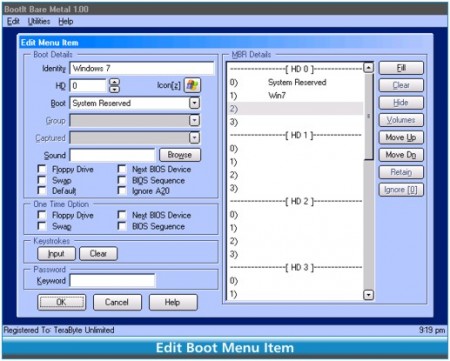
Manage your partitions, install and boot multiple operating systems with ease, back up and restore partitions or entire drives – all this and more, using BootIt Bare Metal. Taking its roots from its highly successful predecessor, BootIt Next Generation, BootIt BM has been developed from the beginning to provide a powerful set of tools for today’s computer users, enthusiasts, and professionals.

BootIt® Bare Metal - Partition Manager

With today’s large hard drive sizes, proper partitioning and management is more important than ever. BootIt BM offers standard partitioning features as well as many special features not found elsewhere:
- Compatible with all Windows versions (9x/Me/NT/2000/XP/2003/Vista/2008/Win7/Servers).
- Compatible with x64 (AMD64/EM64T) and Windows 64bit OS.
- Supports MBR, EMBR and GPT type partitioning.
- Direct support for PATA/SATA (AHCI) drives.
- Create, move, copy, delete, and undelete partitions.
- Optionally, wipe a partition when deleted.
- Non-destructive resizing of FAT/FAT32, NTFS, and Linux Ext2/3/4 partitions.
- Create over 200 primary partitions on EMBR disks.
- Specify unlimited primary partitions on a per-drive basis.
- Convert between MBR, EMBR and GPT type disks.
- Easily enforce Windows 7 partition alignment standards.
- Complete control over drive geometry.
- Directly edit the Windows BCD store to fix booting errors – no Windows DVD required!
- Edit small text files on any supported partition, even those hidden from Windows.
- Supports hard drives beyond 16 exabytes in size.
- and much more…

BootIt® Bare Metal - Boot Manager

BootIt BM provides a full set of options for each boot item, giving the user an unequaled level of flexibility in configuring multi-boot systems:
- Compatible with all Windows versions (9x/Me/NT/2000/XP/2003/Vista/2008/Win7/Servers).
- Compatible with x64 (AMD64/EM64T) and Windows 64bit OS.
- Boot any partition on any hard drive (up to 16), including logical volumes.
- Boot multiple operating systems from a single partition.
- Supports hiding/unhiding partitions, “swapping” of drives, and partition table order for each boot item.
- Automatically detects existing operating systems upon installation and adds them to the boot menu.
- Use the Direct Boot Menu to boot directly into any partition, bypassing the normal boot menu.
- Customize and secure the computer with user IDs and passwords.
- Support booting to Linux, MS-DOS, OS/2, and more...
- and much more…

BootIt® Bare Metal - Disk Imaging

Creating and restoring partition and disk images is a simple matter using the included full version of Image for DOS. Sporting a new graphical user interface, Image for DOS brings complete image file compatibility with TeraByte’s current imaging products (Image for Windows, Image for Linux, and Image for DOS) – a much requested feature. Launched directly from the BootIt BM desktop, accessing this powerful tool is a simple matter of a single mouse click or touch of a key:

- Compatible with all Windows versions (9x/Me/NT/2000/XP/2003/Vista/2008/Win7/Servers).
- Compatible with x64 (AMD64/EM64T) and Windows 64bit OS.
- Compatible with Linux file systems.
- Create backup images of single partitions, multiple partitions, or entire drives.
- Quickly recover from drive failure, corruption or data loss by restoring an image or extracting the data from a backup.
- Migrate to a new drive by restoring an image or by copying (cloning) the original drive. Optionally, expand existing partitions to utilize a larger drive.
- Support for both internal and external drives (including USB 2.0, IEEE1394, and eSATA).

BootIt® Bare Metal - Scripting

BootIt Bare Metal (paid version) includes an enhanced version of the TeraByte OS Deployment Tool Suite Professional that includes the powerful TBScript engine. This offers you an almost unlimited number of solutions:
- Automate partition creation, deletion, sliding, copying, and resizing.
- Automate disk image backups or restores.
- Use existing .TBS scripts to prepare Windows to run on different hardware.
- Access files in supported partitions.
- Explore and change OS configuration files.
- And so much more...

Buy PREMIUM ACCOUNT = Fast and Unlimited Speed + Parallel Downloads

http://ul.to/9xsa0rh8

http://rapidgator.net/file/81330507/BootIt.Bare.Metal.v1.16.retail-FOSI.rar.html

Monday, February 25, 2013

YUMI (Your Universal Multiboot Installer) 0.0.8.9 Portable | 1.2 Mb


YUMI (Your Universal Multiboot Installer) 0.0.8.9 Portable


YUMI (Your Universal Multiboot Installer) 0.0.8.9 Portable | 1.2 Mb


YUMI (Your Universal Multiboot Installer), is the successor to MultibootISOs. It can be used to create a Multiboot USB Flash Drive containing multiple operating systems, antivirus utilities, disc cloning, diagnostic tools, and more. Contrary to MultiBootISO's which used grub to boot ISO files directly from USB, YUMI uses syslinux to boot extracted distributions stored on the USB device, and reverts to using grub to Boot Multiple ISO files from USB, if necessary.

Aside from a few distributions, all files are stored within the Multiboot folder, making for a nicely organized Multiboot Drive that can still be used for other storage purposes.

YUMI works much like Universal USB Installer, except it can be used to install more than one distribution to run from your USB. Distributions can also be uninstalled using the same tool! YUMI is freeware. However, if you enjoy using YUMI and would like to help support its development, please consider making a donation.

DownLoad
YUMI (Your Universal Multiboot Installer) 0.0.8.9 Portable
Letitbit
Turbobit

Tuesday, February 21, 2012

Boot MiniCD Strelec WinPE 3.1 (20.02.2012) | 218.3 MB


Boot MiniCD Strelec WinPE - Bootable CD based on WinPE for working with hard disks, backup and recovery.
Boot MiniCD Strelec WinPE 3.1 (20.02.2012)
The composition of the programs:
Acronis True Image Home 2012 build 6151 Plus Pack
Acronis Disk Director Home 11.0.2343 Update 2
Paragon Partition Manager 11 Professional Edition
EASEUS Partition Master Server Edition 9.1.0
MiniTool Partition Wizard Professional Edition 7.1
Active Partition Manager 1.4.005
Paragon Alignment Tool 3.0
Active Password Changer Professional 4.0 build 0111
Terabyte Image For Windows 2.69
HDD Low Level Format Tool 4.12 (low-level format)
Restore Wizard Windows starts
Total Commander
7-ZIP
Gimagex (graphical shell for ImageX)
browser

Features:
The tablet is not required
Minimum memory 512 MB
For quick loading recommend using a bootable USB drive. How to make the archive.
The screen resolution is placed automatically, but you can adjust your hand.

Download here

http://goo.gl/iEHle