Grow Horizontal Menu With Nice Font

Showing posts with label Utilities. Show all posts

Sunday, March 3, 2013

Global Mapper 14.1.2 Build 022013 (x86/x64) | 66.8/62.8 MB


Global Mapper 14.1.2 Build 022013 (x86/x64)

Global Mapper 14.1.2 Build 022013 (x86/x64) | 66.8/62.8 MB


Global Mapper is an affordable and easy-to-use GIS Data processing application that offers access to an unparalleled variety of spatial datasets and provides just the right level of GIS functionality to satisfy both experienced GIS professionals and mapping novices. Equally well suited as a standalone spatial data management tool and as an integral component of an enterprise-wide GIS, Global Mapper is a must-have for anyone who deals with maps or spatial data.

Global Mapper is more than just a utility; it has built in functionality for distance and area calculations, raster blending, feathering, spectral analysis, elevation querying, line of sight calculations, cut-and-fill volume calculations, as well as advanced capabilities like image rectification, contour generation from surface data, view shed analysis, watershed delineation, sea level rise modeling, terrain layer comparison, and triangulation and gridding of 3D point data. Global Mapper 14.1 provides a dramatic increase in LiDAR processing and display speed, and the ability to view and process point files in the hundreds of millions range. This is beneficial for previewing the data before creating a gridded surface model and includes several options for filtering the data during import and for rendering the point cloud to reflect return type or intensity. Improved metadata access provides a detailed statistical breakdown of the point cloud and customizable point size improves on-screen display. Global Mapper Package (.GMP) files are now able to store LiDAR point clouds in a special compressed format, much smaller than uncompressed LAS data and on par with the best compression available today. This allows LiDAR data to be efficiently archived or shared with other Global Mapper users. Version 14.1 introduces a new OTF reader available for an additional license fee. OTF is a special multi-function format used in war simulation that contains a variety of attribute and surface feature information useful for military work.

Global Mapper's intuitive user interface and logical layout helps smooth the learning curve and ensures that you will be up-and-running in no time. Your company will quickly see a significant return on investment brought about by efficient data processing, accurate map creation and optimized spatial data management.

By providing a complete GIS translation solution out-of-the-box, Global Mapper simplifies the deployment of spatial technology in your company or organization. There's no need to juggle extensions or costly add-ons to gain access to the functionality that you need. Global Mapper's aggressive development and release cycle ensures that the product grows with you as your needs and requirements change. Now you can unblock the GIS dataflow logjam by providing a workable GIS software tool for everyone who needs access to this critical data.

OS : Windows 98, Windows NT, Windows 2000, Windows ME, Windows XP (32 and 64-bit versions), Windows Vista (32 and 64-bit versions), Windows 7/8 (32 and 64-bit versions), and Windows Server 2003/2008/2012
Language : English

Home Page - www.bluemarblegeo.com


Saturday, March 2, 2013

Path Too Long Pro Utility v1.1.0.0 | 3.75 Mb


Path Too Long Pro Utility v1.1.0.0
Path Too Long Pro Utility v1.1.0.0 | 3.75 Mb

ABTO created a Windows tool allowing to copy and delete files and folders with long paths or locked by some applications.
Undeletable files with path too long issue are often created by viruses, adware, different OS and various software applications. Some of them may be harmful for the computer or the whole system and occupy large volumes of space on disks. Path Too Long Utility identifies the processes (running programs) that have locked that file, preventing it from being deleted, moved or renamed.
The tool is a highly effective and user-friendly application. It’s enough just to browse for the file and press the “delete” button to get rid of those irritating files. The program works under Windows 2000, XP, 2003, Vista and Windows 7. 

Our tool will be helpful if you obtain the following messages from Windows:
-Path is too long
-Cannot delete file path too long
-Filename’s too long
-File name is too long to delete
-File path too long
-Path too deep.
-Error 1320. The specified path is too long
-Cannot delete file: “Access is denied”.
-There has been a sharing violation.
-The source or destination file may be in use.
-The file is in use by another program or user.
-Make sure the disk is not full or write-protected and that the file is not currently in use.
-Error Deleting File or Folder
-Cannot delete file or folder. The file name you specified is not valid or too long. Specify a different file name.

Main Features of the Long Pass Utility
-Straightforward interface
-Simple to use
-Developer and end-user versions
-Proven to work
-Delete system locked files
-Can delete files even from mapped network folders
-Can list files and paths which have file path more than 200 characters long
-Close application that uses the file
-Unload locking process
-Copy and delete files and folders
-Delete after reboot
-Omits file name you specified is not valid or too long

Home Page - www.abtosoftware.com/products/path-too-long-utility/

Uconomix uMark Professional v3.10 | 11 Mb


Uconomix uMark Professional v3.10
Uconomix uMark Professional v3.10 | 11 Mb


How can you prevent people from using your personal and professional images and photos? We have the answer - mark them. Mark the images with your name, your company name, a logo or a copyright notice. Let people know that you are the rightful owner of that particular image.

What can you do with uMark?

Add visible watermark to hundreds of images at one go
Batch convert and rename images
Generate thumbnails

What is watermarking?
Watermarking means protecting the image with a copyright notice or a logo that denotes the origin of the image/photo. Such watermark prevents people from using your images and photos without your consent. If they use it they must use it with the your mark. This is where uMark comes in handy. It allows you to watermark multiple images at one go.

Key features of uMark Professional
Support for BMP, JPG, GIF, PNG and TIFF image types
Add text or a logo as a watermark
Add EXIF properties as watermark new
Add image name, folder name, creation or modification date as watermark new
Add multiple watermarks new
Batch processing - watermark hundreds of images at once
Customizable font formatting options for text
Add semi transparent watermarks
Place watermark at predefined or customized positions on the image
Rotate watermark to any degree
Tile the watermark horizontally/vertically or both
Resize output images, generate thumbnails
Convert output images
Open images into uMark directly from Windows Explorer
Drag and drop images to uMark from Windows Explorer new
Save watermark settings for later use
See the full size preview on actual images
Add special characters like © and ® to watermark

Home:
http://www.uconomix.com/Products/uMark/Default.aspx


Download:
http://ul.to/019x5u5f
http://extabit.com/file/29g2ebqrp9c3x/
http://netload.in/dateiYEM6cQCLXW/Uconomix.uMark.Professional.v3.10.Incl.Keygen-Lz0.rar.htm

Thursday, February 28, 2013

Funduc Search and Replace 6.7 Retail | 6.4 MB


Funduc Search and Replace 6.7 Retail
Funduc Search and Replace 6.7 Retail | 6.4 MB

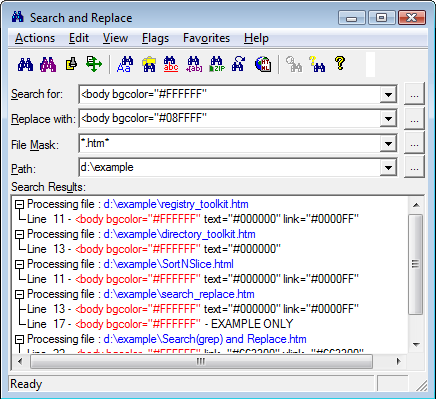
Search and Replace is an award winning, easy to use search and replace utility loved by programmers, webmasters, and novice computer users alike.

Search and Replace looks through multiple files for a string and can also replace it with another string. It can search subdirectories and ZIP files and do case sensitive or insensitive searches. Extensive support for grep style regular expression search & replacements includes operations that span more than one line, incrementing number replacements, and inserting the path & filename in replaced files. Binary search & replace is also available. You can specify multiple include/exclude file masks and filters based on file date & size. Control over replacements includes configurable replacement prompts and a display of replacements before they are made. An easily understood script editor makes frequent &/or complex multi-step search/replace operations easy to prepare. Advanced script operations include a boolean expression evaluator for added control over which files will be processed by the script. The internal context viewer allows you to edit text files. An "HTML Mode" makes plain text -> html character code substitutions. You can also "Touch" files (change time/date stamp). Search and Replace automatically detects if the file being searched is text and can be configured to launch with separate external editors for search hits in text vs. binary files. The program can also launch associated programs on "found" files, e.g., launch your web browser if the search hit occurs in an .htm or .html file.

If you need to find and replace text, or just find text, this utility is a must have. It is significantly faster than other Windows grep-only utilities and allows replacing for the same price as those programs which offer only grep capabilities.

Search and Replace is for Windows NT/2000/XP, Windows 2003, and Windows Vista. 32-bit and x64 versions are available.

Here are some of the basic features of Search and Replace. A history of features by version and an overview of proposed new features are also available.
+ Search and replace operations can be case sensitive or not, they can span multiple files via multiple file masks and filter settings, and they can span more than one line
+ The program can search-replace the Windows Clipboard. You can also do simple searches in the Search Results list (press F3) and you can also limit follow-up search &/or replace to only those files currently listed in the Search Results list.
+ Unicode files are detected automatically for search and replacing.
+ Scripts can be applied to Search/replace strings in the Binary Mode dialog. This allows special processing of RTF codes, HTML codes, Unicode files, with a lookup table created by the user along with several supplied by us.
+ Output in the Search and Replace "Results List" can be sent to your printer, saved to a file (your choice of delimiters), or viewed in your web browser via an automatically generated htm file. If you have a color printer you can print the html file to obtain a color coded output.
+ File operations can be carried out on the files in the search results list.
+ An HTML Mode that automatically makes plain text -> html special character substitutions during search &/or replace operations.
+ The internal "context" viewer allows you to view your search results in context with the surrounding text. You can jump from one "search hit" to the next and edit text files. Search and Replace automatically detects if the file being searched is text and, if not, will automatically view binary files using our freeware companion utility HexView. Alternatively, Search and Replace can be configured to launch with separate external editors for search hits in text vs. binary files. Links off the External Editors page provide information for using TextPad (Helios Software, www.textpad.com), Multi-Edit (American Cybernetics, www.multiedit.com), UltraEdit (IDM Computer Solutions, www.ultraedit.com), Hex Workshop (BreakPoint Software, www.bpsoft.com) and 'frhed' (Raihan Kibria, www.tu-darmstadt.de/~rkibria).
+ Search and Replace can also launch associated programs on "found" files, e.g., launch your web browser if the search hit occurs in an .htm or .html file.
+ Text files can be reformatted w/ word wrap at a specified column.
+ Text can be prepend or appended to a file.
+ An 'Ignore Whitespace' function can find a phrase regardless of where line breaks may lie.
+ The program can read the environment variables on the host computer and use them in a search/replace using the "%%envvar=" syntax. For example, the 'temp' environment variable can be referred using the string "%%envvar=temp%%".
+ Replacements, including those in script and binary operations, can be visualized in context before they are made.
+ You can (optionally) write files changed by a replacement operation to a backup directory and preserve original file time/date stamps during replacements.
+ Regular Expression operators include the basic grep-style substring and match operators, along with special replacement operators such as case change operators, file and path name replacements, counters, and binary mode operators. The Incrementing Counter operations let you allow you to quickly revise a sequence of numbers in one or more files or add numbers where no numbers exist originally. (See Regular Expressions English or Deutsch).
+ Scripts let you specify multiple search/replace combinations, save a particular search or replace string for later use, or process multiple drives/directories and/or file masks. Advanced Script Settings let you control program options, embed comments in scripts, and further specify the files processed during a script operation via a boolean expression evaluator. When building scripts you can easily add the the Search/Replace & Mask/Path values from the mail dialog by holding down the CTRL key while clicking on the Insert or Remove All buttons in the script editor. (See Script Editor page). Scripts include an iterative operator to repeat a script a specified number of times.Binary Mode search and replace lets you process binary files &/or text files with special characters such as tabs, line feed, carriage returns. (See Binary Editor Page).
+ Multiple include & exclude file masks let you, for example, search all ".htm" & ".html" files except the ".htm" files begin with "s" or "t". You can also create complex file masks to include some subdirectories while excluding others. Filter Options allow you, for example, to include only files created after a set date that are smaller than the size you specify.
+ Searching can be halted after the first hit in a file - useful for when you have to search large or many files. A 'no replace' flag is also available to turn off replacement functions - useful for administrators or users who need extra limits on the possibility of inadvertent replacements.
+ Scripts can be applied to the Search &/or Replace strings in advance of an operation. Activated via the Apply Script function, you can, for example, use a conversion script to deal with the plain text equivalents of html special characters or rtf 'escape' codes.
+ User control over replacement prompts/warnings includes one string at a time, one file at a time, all at once (no warnings), and combinations in between such as skipping all remaining occurrences in a file.
+ An enhanced "Touch" dialog allows you to change time/date stamp and attributes of files.
+ Search and Replace can be launched from Windows Start-Find Menu. Files &/or directories dropped from Explorer or File Manger into the Search and Replace main window are automatically recognized for processing. The Windows Explorer shell extension lets you launch Search and Replace on a specific file or group of selected files.
+ An 'UnDo' function is available to reverse the last search-replace (see F1 Hlp).
+ Search ZIP files without manually extracting files first.
+ User configurable fonts & colors.
+ Command line support (14 functions) includes control over most program options & ability to run search & replaces via batch files.
+ Help file includes many examples.
+ An established, mature program with a history of regular updates and solid support.
+ Much more...

Wednesday, February 27, 2013

Mindjet MindManager 2012 v11.2.185 | 123 MB


Mindjet MindManager 2012 v11.2.185
Mindjet MindManager 2012 v11.2.185 | 123 MB

Mindjet® MindManager® Pro 10 transforms brainstorming ideas, strategic thinking, and business information into blueprints for action, enabling teams and organizations to work faster, smarter, and with greater coordination. It extends core mapping functionality with a host of simple tools—collaboration, distribution, administration—making it easy for business professionals to quickly deliver bottom-line benefits enterprise-wide.With Mindjet MindManager Pro 6, you will:
Capture, analyze, and repurpose information from a variety of sources
Streamline business processes and speed decision making
Easily ensure all "stakeholders" stay informed, involved, on task.

Features:

Industry-leading Information Visualizations
Easily lay out, organize and work with ideas and information in a wide variety of interactive visual formats including information maps, outlines, Gantt charts, organization charts, tree diagrams and a special brainstorming mode.

Project & Task Management
Improve project planning by brainstorming and tracking task details, automatically calculating summary tasks and optimizing resource utilization. View MindManager, Outlook and SharePoint* tasks in the new synchronized Gantt view or export tasks to Microsoft Project.

Information Map Presentations
Showcase your ideas and increase engagement using MindManager's automated presentation view or customizable slide shows. With MindManager's dynamic presentations, you'll easily tailor the level of details presented for each audience and capture critical feedback right in the presentation.

Integrations & Sharing
Save time and benefit from powerful integrations. Access and update Microsoft Office files within MindManager's integrated browser. Import from Microsoft Word and Project. Export to Word, Project or PowerPoint. Display dynamic Outlook or Excel content. Export web pages, images, PDF files and more. Or, share hosted interactive map files with anyone on the web even if they do not have MindManager.

Capture Content & Add Context
Easily add hyperlinks, attachments, notes, images, and spreadsheets to provide additional levels of details. Quickly drag and drop content to reorganize it and provide structure. Use icons, tags, topic shapes, callouts, boundaries, colors, topic sorting and numbering to provide additional context.

Interactive Dashboards
Create powerful dynamic Microsoft Outlook dashboards to automatically display (and update) contextually relevant emails, tasks, contacts, notes and appointments. Populate branches with desktop or network folders & files for easy access. Or, perform web searches like Google or Bing with results appearing directly in your map.

Navigation & Viewing Controls
Easily navigate and control the levels of details displayed with powerful features like topic focus, show or hide branch, collapse map, quick filters and advanced power filters. Automatically fit or balance your map within the screen or use the mini-map view to navigate large maps.

Map Sharing Community
Share map templates with the extensive Mindjet community.

Changelog:
New and Improved Features
New Read Me map: For people who create new Connect accounts, when they first land in the application they will be presented with a Map that guides them through learning how to use basic mapping features. Once done they can either save it to share with colleagues later or not.
New ability to e-mail the account owner or administrator (business accounts) to easily ask for help with things like recovering deleted files and folders or discarding a checkout if another user has not checked a file back in that you need. To e-mail your account owner or administrator, simply click on their name in the Files/Folders access area and it prompts you to send an e-mail where you can enter your request for help.

Usability Improvements
When you previously unshared a folder with a user, their user name might still be listed as having access to it. We’ve fixed this issue such that the displayed folder’s list of users always accurately reflects its access permissions.
Changes to a user’s access role or access levels (e.g. changing a Member or Guest from "Read-only" to "Edit" or vice versa) are now displayed immediately. We have eliminated the sporadic delay some users experienced when making such changes.
We also fixed an issue where users’ names sometimes appeared multiple times in a file or folder’s access list. Now, a listed user name appears only once.
We repaired the ability to reset your password from the login page.
We eliminated an intermittent issue that changed the text font or color when typing in a topic on a map. Now, the text you add to a topic will maintain the topic’s text style.

Known Issues
NOTE: Some users may need to clear their browser cache in order for the new features and enhancements to take effect.
Mindjet Connect continues to support uploading files up to 64MB, a limit not previously documented. However, if you attempt to upload a file greater than 64MB, there is no error
message to inform you of the failed upload.
At times, users are unable to close “Get Started” map or switch to another Tab while this map is open. Reloading the webpage will enable the close the map.
Firefox 3.6 users on Mac OS X will find that the File>Export window is not displayed properly.
Safari users will need to click on the map in order to add a topic to it.

Tuesday, February 26, 2013

CST Studio Suite 2012 SP8 (x86/x64) | 4.3 GB


CST Studio Suite 2012 SP8 (x86/x64)


CST Studio Suite 2012 SP8 (x86/x64) | 4.3 GB

CST’s latest software release, CST STUDIO SUITE version 2012 and its multitude of powerful new features and functionality, can help engineers to streamline their workflows and shorten development cycles. The most significant development in this respect is System Assembly and Modeling.

CST Studio Suite is the culmination of many years of research and development into the most accurate and efficient computational solutions for electromagnetic designs. It comprises CST’s tools for the design and optimization of devices operating in a wide range of frequencies - static to optical. Analyses may include thermal and mechanical effects, as well as circuit simulation. CST STUDIO SUITE benefits from an integrated design environment which gives access to the entire range of solver technology. System assembly and modeling facilitates multi-physics and co-simulation as well as the management of entire electromagnetic systems. CST STUDIO SUITE can offer considerable product to market advantages such as shorter development cycles, virtual prototyping before physical trials, and optimization instead of experimentation.

About CST

CST develops and markets high performance software for the simulation of electromagnetic fields in all frequency bands. Its success is based on the implementation of leading edge technology in a user-friendly interface. CST’s customers are market leaders in industries as diverse as Telecommunications, Defense, Automotive, Electronics, and Medical Equipment. Today CST employs 190 sales, development, and support personnel, and enjoys a market share of over 30% in high frequency 3D EM simulation.


CST Studio Suite 2012 SP8 (x86/x64)


AI RoboForm Enterprise 7.8.7.5 Final | 12.5 Mb


AI RoboForm Enterprise 7.8.7.5 Final

AI RoboForm Enterprise 7.8.7.5 Final | 12.5 Mb

Roboform is the top-rated Password Manager asecurely stores online and offline passwords, automatically logs you into online accounts and completes online registration and checkout forms with one click. RoboForm is a push-button web form filler with some serious Artificial Intelligence (AI) inside. It allows you to define your personal profile or usual responses to a web form. This information is then saved, and when you need to fill a form, just click Fill Forms button, and form is filled out. Works as an add-on to Microsoft Internet Explorer, Mozilla, Firefox or Netscape web browsers. RoboForm2Go works on USB Flash Drives. Plug your flash drive into any computer and enjoy all the benefits of RoboForm.

Install this version directly on your flash drive. Store and back up your RoboForm files on your Windows Mobile, Palm, or Symbian device. View and search RoboForm files. Includes full featured password generator. AI RoboForm is fully client-based, so it is very fast, it never disables web site functions, and it works even in pop-up HTML windows. The most important feature of AI RoboForm is high accuracy - it fills 95 percent of all fields correctly.

RoboForm allows you to:
- Manage your passwords and Log In automatically.
- Fill long registration and checkout forms with one click.
- Encrypt your passwords to achieve complete security.
- Generate random passwords to maximize password strength.
- Back up and Synchronize Passwords between computers.
- Fight Phishing and Defeat Keyloggers.

RoboForm Password Manager works with:
- IE 6, 7, 8
- Firefox 2, 3, 3.5
- Chrome/Chromium
- XP, Server, Vista, Windows 7
- USB Devices
- iPhone, WinMobile, Palm, BlackBerry, Symbian
- Mac, Opera, Linux access through RoboForm Online

Features:
- AutoSave passwords in browser.
- AutoFill passwords to login form.
- Click Login button for you.
- Fill personal info into online forms.
- Save offline passwords and notes.
- Generate Secure Random Passwords.
- Encrypt passwords and personal data using AES, Blowfish, RC6, 3-DES or 1-DES algorithms.
- All personal info is stored on your computer only.
- Take RoboForm with you on USB disk for ultimate portability.
- Sync your passwords and notes to Palm or Pocket PC.
- Backup and Restore, Print your passwords.
- More features: drill down for more.
- It is well-behaved: NO ADWARE, NO SPYWARE.
- Works under Windows as an add-on to IE-based browsers.
- Works with Netscape, Mozilla, Firefox under Windows.

Home Page - www.roboform.com

Monday, February 18, 2013

ExamDiff Pro v6.0.3.3 (x86 x64)


ExamDiff Pro v6.0.3.3 (x86 x64)

ExamDiff Pro v6.0.3.3 (x86 x64)
8.2 MB / 8.8 MB


ExamDiff Pro is a powerful yet intuitive and easy to use visual file and directory comparison tool for Windows 98/Me/2000/XP/2003/Vista/7/2008/8/2012. It features unique functionality that distinguishes ExamDiff Pro from other comparison programs. If you've been frustrated with other comparison utilities, you will find that ExamDiff Pro offers a much more efficient and user-friendly way to compare files and folders.
Key Features[ulist]
Compares text files, binary files, and directories.
Performs three-way diff and merge.
Highlights differences down to the level of lines, words or characters.
Highlights document syntax.
Fuzzy line matching.
Ability to recognize moved text blocks.
Automated directory synchronization.
Line Inspector panel for easy recognition of differences within lines.
Ability to add manual synchronization points to text file comparison.
Compares directly from Windows Explorer.
Allows file editing within file comparison panes.
Allows copying, renaming, and deleting files or directories.
Saves the file differences in a standard UNIX DIFF file or to a dynamic HTML web page.
Prints and print previews diff reports.
Easy navigation through the differences.
Advanced Search features.
Drag and drop support.
Advanced Ignore options, for ignoring capitalization, white space, programming-language comments, and more.
Word wrapping.
Plug-in support.
Drag and drop support.
Can create directory snapsho

AppPerfect Load Test 13.0.0.20121004-3755 | 97 Mb

AppPerfect Load Test 13.0.0.20121004-3755\

AppPerfect Load Test 13.0.0.20121004-3755 | 97 Mb
Perfect Load Test is a fully Automated Load test, Stress test and Performance Test solution that is easy to use and cost effective. Most application performance and stability issues arise only when the server is stressed with a high user load. AppPerfect Web Load Test helps you design and simulate thousands of users in a realistic manner which can be used to load test your application infrastructure for performance, reliability and scalability.

AppPerfect Load Test is designed to answer vital questions such as: 
Do you know the number of concurrent users/requests your application can support ?
Is your current infrastructure sufficient to meet your user demand ?
Will your application scale as more users access it ?
How does your application's response time change as number of users increase ?
Does your Web application perform the same after 96 hours of deployment as it did after 4 hours ?

AppPerfect Load Test can help you identify a variety of problems before you go into production: 
Software design issues (incorrect concurrency/pooling mechanism, poor optimization, memory build-up, etc.)
Server configuration issues (Web server, application server, database server, load balancer, etc.)
Hardware limitation issues (Excessive disk I/O, CPU maximization, memory limitations, network bottleneck, etc.)

AppPerfect Load Test is easy to use with no programming required. It provides a unique view of the target machine with integrated load testing, stress testing and performance testing parameters such as response time and hit count along with monitoring of system resources such as CPU, disk, network and memory.

Home Page - www.appperfect.com/products/load-test.html

Monday, February 11, 2013

SIV (System Information Viewer) 4.35 Beta 8 Portable | 5.66 Mb


SIV (System Information Viewer) 4.35 Beta 8 Portable


SIV (System Information Viewer) 4.35 Beta 8 Portable | 5.66 Mb


System Information Viewer is a general Windows utility for displaying lots of useful Windows, Network and hardware info - CPU info, PCI info, PCMCIA info, USB info, Machine Info, Hardware Sensors, Networked computers, Operating System Information and more. I use Craig Hart's pcidevs.txt file for my PCI device display with my usbdevs.txt being used for the USB devices, mondevs.txt for monitor descriptions and pcmdevs.txt for PCMCIA device descriptions. SIV is designed for Windows XP, Vista, 2008, 2003, 2000 and NT4. Windows 95, 98 and Me are also supported.


http://u9026512.letitbit.net/download/52771.52c7043c5c21230540f7326154af/SIV_4.35_Beta_8_Portable.rar.html

Sunday, February 10, 2013

PVS-Studio 4.74 | 19.6 MB


PVS-Studio v4.74
PVS-Studio 4.74 | 19.6 MB

PVS-Studio is a static analyzer that detects errors in source code of C/C++/C++0x applications. There are 3 sets of rules included into PVS-Studio.
1. Diagnosis of 64-bit errors (Viva64)
2. Diagnosis of parallel errors (VivaMP)
3. General-purpose diagnosis

To learn more about each type of diagnosis, visit the corresponding pages. The PVS-Studio tool is intended for developers of contemporary applications and it integrates into the Visual Studio 2005/2008/2010 environment providing the programmer with a convenient user interface to analyze files, navigate through code and get reference information. You do not need to study documentation and settings preliminarily to work with the analyzer. The analyzer is ready to work right after it is installed.

The methodology of static code analysis we employ has significant advantages over other types of analysis since it allows you to cover the whole program code. The procedure of code check cannot damage the code itself in any way. The analysis process is completely controlled by person and it is the programmer who decides if it needs modification.

The PVS-Studio tool is an own development of the Russian company OOO "Program Verification Systems".
PVS-Studio Features

* Integration with Visual Studio 2005/2008/2010;
* online-help;
* pdf-documentation;
* saving and loading of analysis results;
* capability of command line launch;
* support of all cores and processors;
* estimate of complexity of 64-bit code migration;
* support of Windows (LLP64) and Linux (LP64) data models;
* interactive filters;
* convenient integration into the team development process;
* marking of program text with the purpose of checking new code only.

Home Page - http://www.diyphotography.net/